
Document intelligence
The Knowledge base reads your documents, connects them, and answers questions with citations to the exact passage.
Ask from the console, through the API, or from an AI assistant over MCP.
How a document is processed#
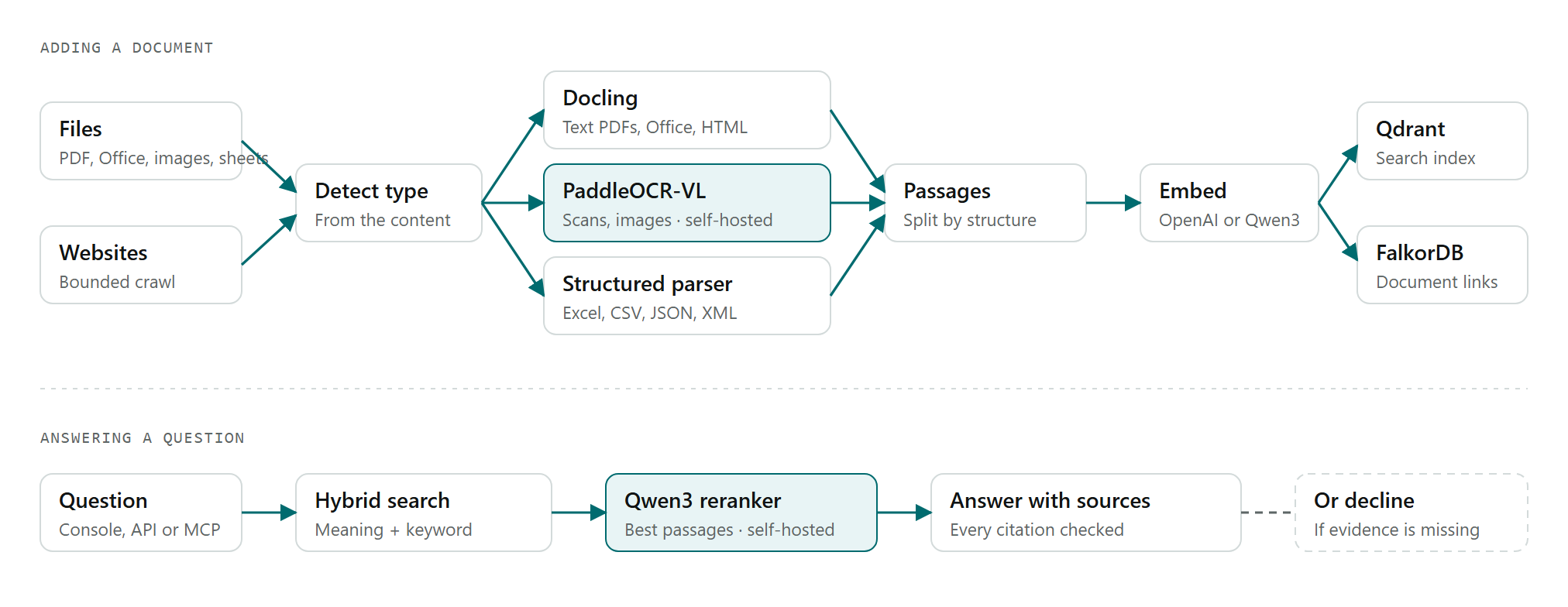
Figure 1. Each file goes to the reader built for its type, then becomes searchable passages with links to related documents.
The right reader for each file#
The file type is detected from its contents, not its name.
| Content | Reader | Notes |
|---|---|---|
| Text PDFs, Word, PowerPoint, HTML | Docling | Keeps headings, tables and reading order. |
| Scanned PDFs and images | PaddleOCR-VL (self-hosted) | Vision OCR on our GPU server. If that server is unavailable, Docling's built-in OCR takes over. |
| Excel, CSV, JSON, XML | Spreadsheet parser | No model needed. Tables are split between rows with the header kept, so citations point to a sheet and cell range. |
| Email and ZIP files | Unpacker | Each attachment goes to its own reader. |
| Websites | Crawler | A bounded crawl that respects robots.txt. |
Search and answers#
| Stage | What it does |
|---|---|
| Embeddings | Turns passages into vectors for meaning-based search. The model is set per workspace. |
| Search | Qdrant combines meaning-based and keyword search. |
| Reranking | Qwen3-Reranker-4B (self-hosted) picks the best passages. |
| Document links | Shows which documents cite each other or share terms, and flags documents that are cited but not uploaded. |
| Answer | The model chosen in Settings → LLM writes the answer from the retrieved passages only. |
Every citation is checked against the retrieved passages. If the evidence is missing, the Knowledge base says so instead of guessing, and logs the question for review.
Where your data goes#
Most steps run on our own servers. Two steps use an outside AI provider by default, and both can be switched to self-hosted models.
| Step | Runs on | Sent outside |
|---|---|---|
| Storing documents | Our servers | Nothing |
| Reading files and OCR | Our servers | Nothing |
| Reranking results | Our servers | Nothing |
| Creating search vectors | OpenAI, by default | Passage text. Choose self-hosted embeddings to keep it in. |
| Writing answers | The model in Settings → LLM | The question and the passages used. Choose a self-hosted model to keep it in. |
Working with documents#
- Large files are processed in the background, so uploads return straight away.
- Uploading a new version builds it in the background, then swaps it in. The previous version is kept.
- Each workspace has its own search index and document graph.
- Operators, contributors and admins can add documents. Everyone in the workspace can ask questions.